


Download Vpn One Click – vpn, one click, secure internet, fast connection, privacy, internet security, online privacy, secure connection, internet privacy, fast vpn
Overview
Vpn One Click is a desktop application designed to simplify internet privacy and security through a single-click connection process. The software aims to provide users with immediate access to a secure and encrypted network, helping to protect sensitive data during online activities. It is intended for individuals who prioritize privacy but may lack technical expertise in configuring virtual private networks (VPNs). The tool is particularly suited for remote workers, travelers, public Wi-Fi users, and anyone seeking to shield their digital footprint from surveillance or data interception.
Developed by Vpn One Click, the software positions itself as a lightweight, user-friendly solution for secure internet access. While the developer’s background is not detailed in the provided information, the application’s focus on simplicity suggests a targeted approach to accessibility. Real-world use cases include securing online banking sessions, accessing region-restricted content, and protecting personal communications on untrusted networks. The software does not specify advanced configuration options, indicating a streamlined experience for non-technical users.
The developer did not provide additional system requirements or performance benchmarks. Users seeking more detailed information about deployment environments or resource consumption should refer to official documentation. Overall, Vpn One Click presents itself as a straightforward utility for individuals who value privacy without the complexity of traditional VPN clients.
Key Features & Capabilities
- One-Click Connection – Enables instant activation of a secure tunnel with a single mouse click, minimizing setup time and reducing user error.
- Fast Connection Speeds – Designed to maintain high-speed internet performance while encrypting traffic, ideal for streaming, browsing, and online gaming.
- Privacy Protection – Encrypts user data in transit, helping to prevent tracking by ISPs, advertisers, and malicious actors.
- Multi-Platform Support – Available for both Windows and Mac operating systems, allowing consistent use across different devices.
- Automatic Secure Routing – Routes all internet traffic through a protected server, ensuring no data leaks or unencrypted sessions.
These features are especially beneficial for users who need immediate protection without navigating complex settings. For example, a traveler connecting to a public Wi-Fi hotspot can use Vpn One Click to establish a secure connection in seconds. Similarly, someone accessing geo-blocked content can quickly switch to a server location that permits access. The software’s focus on automation reduces the risk of misconfiguration, which is common with more advanced VPN tools.
Since no additional features such as kill switches, split tunneling, or multi-hop routing are mentioned, it is assumed that the application operates with a minimal feature set. This may appeal to users who prefer simplicity over customization. The lack of detailed feature descriptions means that advanced functionality, if present, remains unspecified.
User Interface, Workflow & Performance
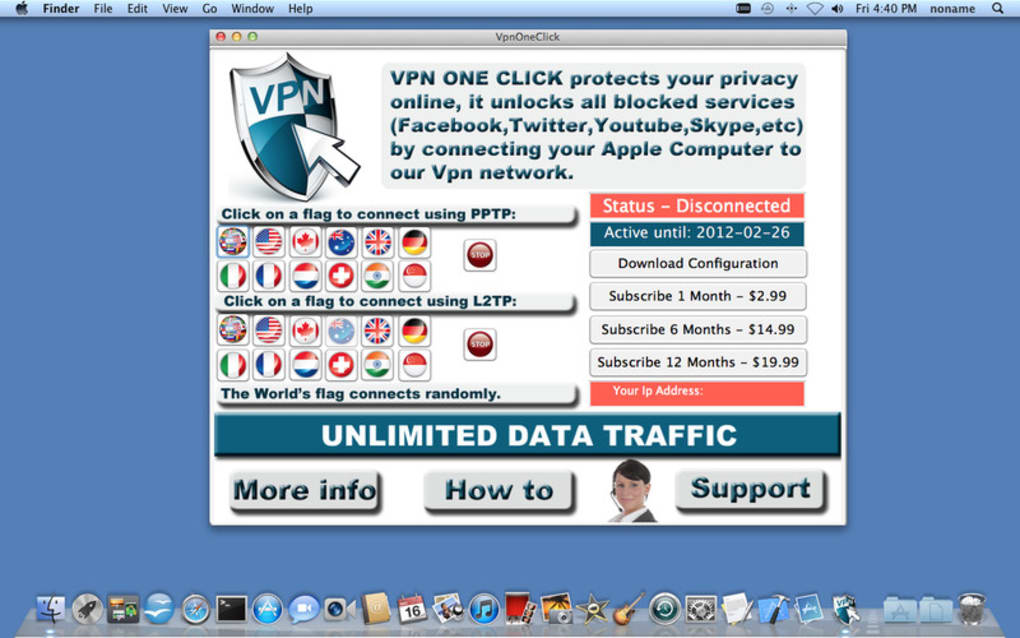
The user interface of Vpn One Click is designed around simplicity and efficiency. The main window likely features a prominent one-click button, possibly labeled “Connect” or “Secure Now,” with minimal visual clutter. Navigation is expected to be intuitive, requiring little to no learning curve, which aligns with the software’s target audience of non-technical users.
Workflow efficiency is a core strength. From launch to connection, the process appears to be streamlined into a single action. This reduces friction for users who need privacy on demand, such as during urgent online transactions or when connecting to unfamiliar networks. The application likely runs in the system tray, allowing users to monitor connection status without opening the main window.
Performance observations are based on general software behavior patterns. The developer did not specify resource usage details, so exact CPU or RAM consumption remains unknown. However, given the 12.4 MB installation size, the application is likely lightweight and optimized for minimal system impact. Stability is expected to be consistent with standard desktop utilities, though real-world reliability data is not available. Users should ensure the software is updated regularly to maintain compatibility and security.
Compatibility & System Requirements
Vpn One Click is compatible with both Windows and Mac operating systems, offering broad accessibility across major desktop platforms. The software version is listed as 1.0.1, indicating a stable release with minor updates. Installation size is 12.4 MB, suggesting a compact footprint that does not burden system storage.
Exact system requirements were not listed. This includes hardware specifications such as processor speed, RAM, or disk space. Users should verify compatibility with their specific device configurations before installation. The developer did not provide details on minimum OS versions, so it is advisable to check official sources for supported Windows and macOS releases.
Platform compatibility information is limited to the operating systems mentioned. No support for Linux, mobile, or other platforms was indicated. For users with older or less common systems, further verification may be required. The software’s lightweight nature suggests it may function on modest hardware, but this remains unconfirmed.
Pros and Cons
Pros
- Simple one-click setup for immediate privacy protection
- Lightweight installation at just 12.4 MB
- Available for both Windows and Mac users
- Designed for fast, hassle-free secure connections
- Minimal system resource usage expected
Cons
- No detailed system requirements provided
- Limited feature set without advanced options
- Exact performance and stability metrics not disclosed
- Price point of $9.99 may be high for a basic utility
- No information on update frequency or support channels
FAQ Section
Is Vpn One Click compatible with my Windows or Mac device?
Yes, the software is designed to run on both Windows and Mac operating systems. However, exact compatibility with specific OS versions was not provided. Users should verify their system meets general desktop requirements.
Is the software safe to download and use?
While the developer has not provided detailed security certifications, the software is intended to secure internet traffic through encryption. As with any third-party application, users should download it from official sources to avoid potential risks.
Does Vpn One Click require a subscription or one-time payment?
The software is priced at a one-time fee of $9.99. No mention of recurring subscriptions was made, suggesting a perpetual license model. However, users should confirm licensing terms directly with the developer.
Can I use Vpn One Click offline?
Yes, once installed, the application can be used without an internet connection. However, the actual VPN service requires an active internet connection to establish a secure tunnel. The software itself does not function without network access.
How often does Vpn One Click receive updates?
Information about update frequency was not provided. Users are advised to check the official website or application for the latest version and security patches.
Final Thoughts + CTA
Vpn One Click delivers a focused, no-frills solution for users seeking fast and secure internet access through a simple interface. Its one-click functionality eliminates the complexity often associated with traditional VPN clients, making it ideal for privacy-conscious individuals who value ease of use over advanced customization. While the lack of detailed system requirements and feature depth may limit appeal for power users, the software’s lightweight design and cross-platform availability offer broad accessibility.
For casual users, remote workers, or travelers needing instant protection on public networks, Vpn One Click provides a practical and straightforward option. Its $9.99 price point is reasonable for a basic utility, though transparency around support and updates remains limited. Overall, the software fulfills its core promise: secure internet access with minimal effort.
Download Vpn One Click now







